


How to Add Emojis to React Apps: Complete Guide (Updated July 2026)
Learn how to add emoji pickers to React apps updated July 2026. Compare libraries, optimize performance, and build collaborative emoji reactions.

You've probably tried adding emoji reactions to your React app and ended up in a rabbit hole of WebSocket configurations, state management nightmares, and custom UI components that break on mobile. The good news is that modern solutions have completely changed how developers handle emojis in real-time apps. Whether you're looking for a simple picker library or building complex real-time emoji reactions, there are now simple approaches that get you up and running in minutes instead of weeks with tools like Velt.
TLDR:
- Add emojis to React with emoji-picker-react in just one npm install command
- Use direct Unicode emojis in JSX for simple cases, libraries for complex interactions
- Wrap emojis in
<span role="img" aria-label="description">for screen reader accessibility - Code splitting and virtualization prevent emoji libraries from bloating your bundle size
- Velt delivers real-time emoji reactions as part of its review and approval infrastructure, with minimal setup and real-time sync included
Choosing the Right Emoji Picker Library
Adding emojis to React apps has never been easier thanks to dedicated picker libraries. These tools handle the heavy lifting of emoji categorization, search functionality, and cross-browser compatibility.
The most popular choice is emoji-picker-react, which offers a clean API and regular updates. Installation takes seconds:
npm i emoji-picker-react
Here's a basic implementation:
import EmojiPicker from 'emoji-picker-react'; function MyComponent() { const [showPicker, setShowPicker] = useState(false); const onEmojiClick = (emojiObject) => { console.log(emojiObject.emoji); }; return ( <div> <button onClick={() => setShowPicker(!showPicker)}> Add Emoji </button> {showPicker && <EmojiPicker onEmojiClick={onEmojiClick} />} </div> ); }
Emoji-mart provides another solid option with extensive customization options, while react-emoji-render offers a minimalist approach perfect for simple use cases.
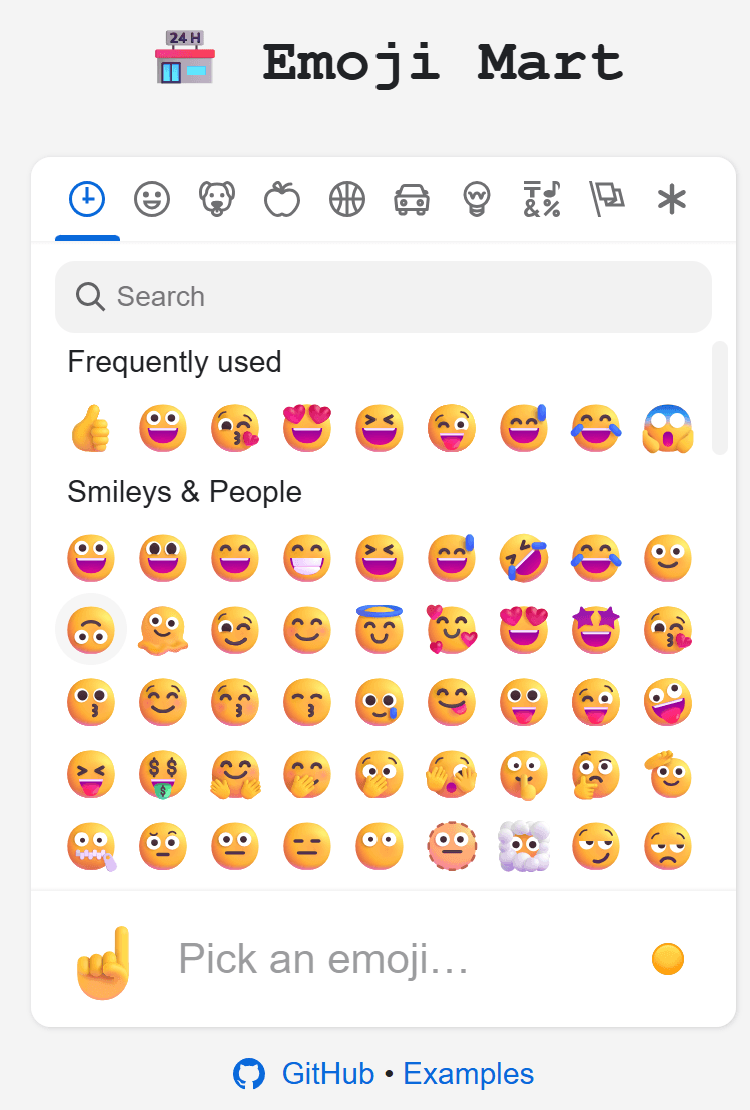
The key advantage of these libraries is their plug-and-play nature. You get professional emoji selection without building complex UI components from scratch. This approach works particularly well when building real-time multi-user features. For apps requiring emoji reactions across multiple users, you'll need more sophisticated solutions that handle WebSocket synchronization.
For apps with real-time emoji reactions, accessibility becomes more complex. You need to announce new reactions without overwhelming users. This is where CRDT implementation helps maintain consistent emoji state across users while preserving accessibility attributes.
Consider emoji frequency in your design. The Bureau of Internet Accessibility recommends limiting emoji density to maintain readability. When building WebSocket-powered emoji features, test with actual screen readers to make sure your implementation works smoothly.
Overusing emojis without proper labels creates navigation nightmares for screen reader users, who might hear dozens of unlabeled symbols.
Popular React Emoji Libraries Comparison
Choosing the right emoji library depends on your app's specific needs and performance requirements. Each solution offers different trade-offs between features, bundle size, and customization options.
Emoji-picker-react strikes a balance between features and simplicity. Its React hooks integration makes state management straightforward, and the clean API reduces implementation time by a lot. At ~300KB minified, it is a reasonable choice for most React apps.
Emoji-mart (v5) delivers the most complete experience with full categorization, search functionality, and skin tone support. Note that v5 restructured into scoped packages: you now install emoji-mart, @emoji-mart/data, and @emoji-mart/react separately. At ~75.8KB minified, it is now the lightest full-featured option. It is perfect for apps where emoji selection is a primary feature.
| Library | Bundle Size (minified) | Features | Ideal Use |
|---|---|---|---|
| emoji-mart (v5) | ~75.8KB | Framework-agnostic, @emoji-mart/react, full picker, search, categories | Feature-rich applications |
| react-emoji-render | ~154KB | EmojiOne display (unmaintained, last release 4 years ago) | Legacy projects only |
| emoji-picker-react | ~300KB | Simple picker, React hooks, dark mode, i18n | Quick integration |
React-emoji-render has not been updated in four years (v2.0.1, last published 2021) and is no longer actively maintained. Avoid it for new projects. For performance-critical apps that need lightweight emoji display, emoji-mart v5 at ~75.8KB is now the better pick, with active maintenance and a framework-agnostic core.
Bundle size becomes important when building collaborative apps that already include WebSocket libraries and state management tools.
For performance comparisons across different scenarios, npm-compare provides detailed metrics. When choosing alternatives to heavy solutions, consider lightweight Firebase alternatives that complement smaller emoji libraries.
Performance Optimization for Emoji Display
Emoji display performance can make or break user experience, especially in apps with heavy emoji usage. Native emoji display outperforms image-based solutions since browsers handle Unicode characters well without additional network requests.
Bundle size matters a lot, so you don't bloat production bundles considerably. Choose libraries based on your performance budget and feature requirements.
Code splitting changes emoji performance by loading components only when needed:
import React, { lazy, Suspense, useState } from 'react';

const EmojiPicker = lazy(() => import('emoji-picker-react'));

function MyComponent() {
  const [showPicker, setShowPicker] = useState(false);

  return (
    <div>
      <button onClick={() => setShowPicker(!showPicker)}>
        Add Emoji
      </button>
      {showPicker && (
        <Suspense fallback={<div>Loading...</div>}>
          <EmojiPicker />
        </Suspense>
      )}
    </div>
  );
}
List virtualization becomes important when displaying thousands of emojis. React-window allows smooth scrolling by displaying only visible items:
import { FixedSizeGrid } from 'react-window';

const EMOJIS = ['😀', '😂', '😍', '🎉', '🔥' /* ...hundreds more */];
const COLUMN_COUNT = 8;

function EmojiGrid() {
  return (
    <FixedSizeGrid
      columnCount={COLUMN_COUNT}
      columnWidth={40}
      height={300}
      rowCount={Math.ceil(EMOJIS.length / COLUMN_COUNT)}
      rowHeight={40}
      width={320}
    >
      {({ columnIndex, rowIndex, style }) => {
        const index = rowIndex * COLUMN_COUNT + columnIndex;
        return index < EMOJIS.length ? (
          <span style={style}>{EMOJIS[index]}</span>
        ) : null;
      }}
    </FixedSizeGrid>
  );
}
Virtualization reduces DOM nodes from thousands to dozens, dramatically improving scroll performance and memory usage.
For real-time emoji reactions, optimize WebSocket connections to batch emoji updates instead of sending individual events. This prevents UI thrashing during high-activity periods.
Consider long polling alternatives for less frequent emoji interactions. The React performance guide covers additional optimization strategies.
Adding Real-Time Emoji Reactions to Your React App
Building collaborative emoji reactions from scratch means wrestling with WebSocket infrastructure, state synchronization, and real-time updates. That's weeks of development time before you even touch the actual emoji functionality.
Velt eliminates this complexity with ready-to-use components that work out of the box. You get emoji reactions, contextual comments, and real-time presence with a minimal setup.

Here's how simple it gets:
import { VeltProvider, VeltComments, VeltReactions } from '@veltdev/react'; function App() { return ( <VeltProvider apiKey="your-api-key"> <div className="document"> <VeltComments /> <VeltReactions /> </div> </VeltProvider> ); }
The reactions component handles emoji selection, real-time synchronization, and user presence automatically. No WebSocket management, no state conflicts, no infrastructure headaches.

Velt provides review and approval infrastructure built for SaaS products. Emoji reactions ship as part of a complete feature set: contextual comments, approval workflows, presence, notifications, audit trails, and recording.
Unlike building with Socket.IO or Firebase, Velt ships emoji reactions as part of its review and approval infrastructure. As a commenting SDK built for SaaS products, Velt covers contextual comments, approval workflows, presence, notifications, audit trails, and recording. Users can react to comments, documents, or any DOM element with contextual emoji feedback.
FAQ
How do I add a simple emoji picker to my React app?
Install emoji-picker-react with npm i emoji-picker-react, then import and use the component with an onEmojiClick handler. The basic setup takes just a short snippet and handles emoji categorization, search, and cross-browser compatibility automatically.
What's the difference between using Unicode emojis and emoji picker libraries?
Unicode emojis (like copying 🎉 directly into JSX) work great for static content and are screen reader friendly, while picker libraries provide user interaction, search functionality, and organized emoji selection. Use Unicode for simple cases, libraries for interactive features.
How do I make emojis accessible for screen readers?
Wrap emojis in a <span role="img" aria-label="description"> element with a descriptive label, or use aria-hidden="true" for purely decorative emojis. Libraries like a11y-react-emoji handle these accessibility patterns automatically.
Which emoji library should I choose for performance-critical apps?
Emoji-mart v5 at ~75.8KB is the lightest full-featured option and the best pick for performance-critical apps. Emoji-picker-react (~300KB) is a reasonable choice for quick integration. Avoid react-emoji-render for new projects as it is no longer maintained. Use code splitting with React.lazy() to load emoji components only when needed, reducing initial bundle size.
Can I build real-time emoji reactions without managing WebSocket infrastructure?
Yes, modern solutions provide real-time emoji reactions with minimal setup and real-time synchronization included. This removes the need to build WebSocket connections, state management, and conflict resolution from scratch.
Key Takeaways for Adding Emojis to React Apps
Emojis have become an expected part of modern communication. The ability to express ideas and reactions with an image is a powerful tool that supports native communication within your app. This simple feature can become complex depending on the needs of your app and the performance expectations. Velt is review and approval infrastructure for SaaS products, shipping emoji reactions, contextual comments, approval workflows, presence, notifications, audit trails, and recording out of the box. Teams ship in days, not weeks, with no WebSocket infrastructure to wire up from scratch.