

BlockNote Review: The Ultimate Open Source Block Editor (Updated July 2026)
Complete BlockNote review for React developers. Learn setup, collaboration features, TipTap comparison, and how to add real-time editing updated July 2026.

You've likely stared at a blank React project wondering how you'll build a rich text editor that doesn't look like it's from 2010. The good news is that modern tools like BlockNote have solved the heavy lifting: drag-and-drop blocks, real-time collaboration, and AI integration all work out of the box. But with so many options out there, you might be wondering if BlockNote is actually worth your time and whether it'll play nice with your existing React setup.
BlockNote provides an organized and straightforward editing experience built to pair with review and approval infrastructure like Velt. Velt adds the human review layer production editing apps need: comments, approval workflows, presence, notifications, audit trails, and recording.
TLDR:
- BlockNote provides Notion-style block editing for React with faster shipping than custom builds
- Supports real-time collaboration via Yjs plus AI integration out of the box
- Configuration options let you customize everything from available block types to keyboard shortcuts.
- More opinionated than TipTap, but requires less ProseMirror knowledge to implement
- Works with review and approval infrastructure like Velt for comments, approval workflows, notifications, and audit trails
What is BlockNote
BlockNote is a block-based rich text editor designed for React developers who need collaborative editing features without spending months building custom solutions. Think Notion's editing experience, but as an open-source component you can drop into your React app.
Built on top of ProseMirror and TipTap, BlockNote provides a battle-tested foundation while abstracting away the complexity of managing editor state and block structures. The project has gained major traction on GitHub with developers who appreciate its opinionated approach to rich text editing.
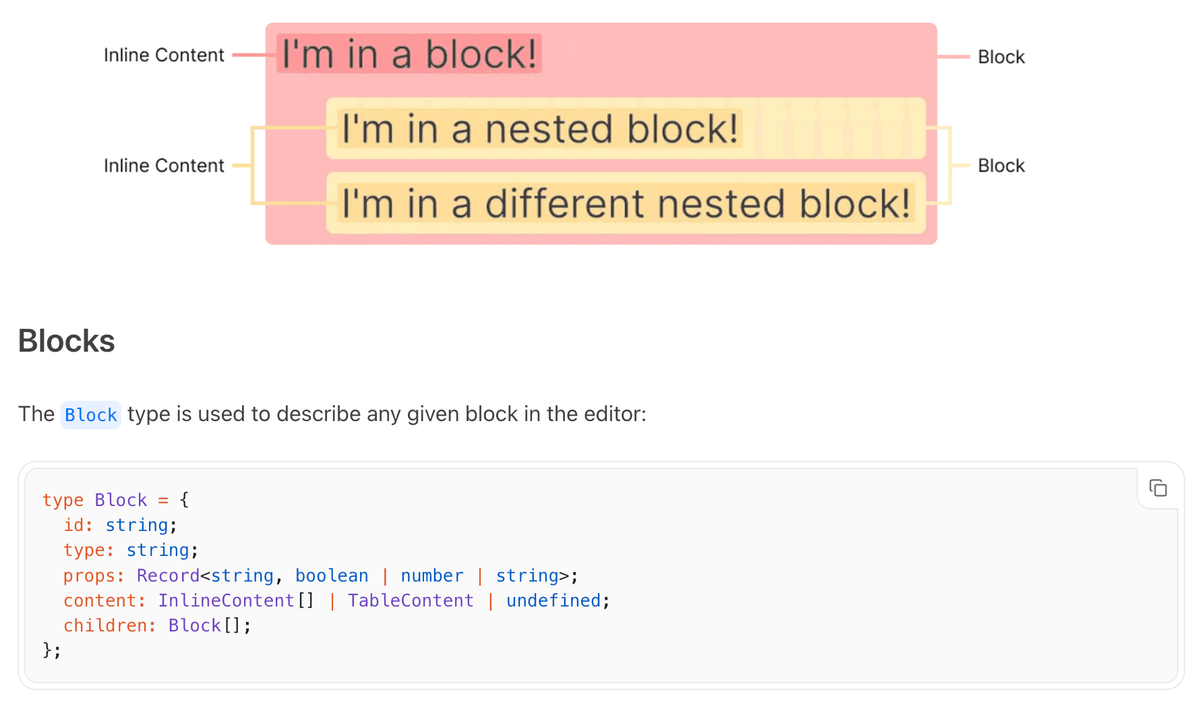
What sets BlockNote apart is its focus on developer experience. Instead of wrestling with low-level editor APIs, you get a component that handles block creation, deletion, and manipulation out of the box. The editor supports everything from basic text formatting to complex nested structures.
BlockNote eliminates the months of development typically required to build a production-ready block editor, letting developers focus on their core product features instead of editor infrastructure.
The official BlockNote website showcases live examples that show the editor's features in real-world scenarios. You can see how blocks behave, test the drag-and-drop functionality, and check out customization options before committing to implementation.
For teams building collaborative apps, BlockNote integrates well with full collaboration layers. While BlockNote handles the editing experience, solutions like Veltcan help you assess additional collaboration needs beyond basic text editing.
Key Features and Functions
BlockNote's feature set tackles the most common pain points developers face when building rich text editors. The block-based architecture means users can create, move, and delete content blocks intuitively, just like in Notion or other modern editors.
The editor includes smooth animations and transitions that make block manipulation feel natural. When users drag blocks around or create new ones, the interface responds with polished animations that improve the user experience without feeling sluggish.
Customization options are extensive but approachable. You can modify block types, add custom styling, and integrate with your existing design system. The component accepts custom renderers for different block types, letting you create specialized content blocks for your specific use case.
AI integration through @blocknote/xl-ai opens up possibilities for content generation, editing assistance, and smart formatting. The AI features can help users write better content or automate repetitive editing tasks.
| Feature | Description | Use Case |
|---|---|---|
| Block Architecture | Notion-style content blocks | Structured content creation |
| Real-time Collaboration | Multi-user editing with conflict resolution | Team document editing |
| AI Integration | Content generation and editing assistance | Enhanced writing workflows |
| Custom Block Types | Extensible block system | Specialized content formats |
The @blocknote/react package on npm includes TypeScript definitions and React-specific optimizations. You get proper type checking and React DevTools integration out of the box.
For developers building full editing experiences, BlockNote's editor pairs well with review and approval infrastructure like Velt. Adding Velt brings comments, approval workflows, presence, notifications, audit trails, and recording to BlockNote without extra development work.
Setting Up BlockNote in React
Getting BlockNote running in your React app takes just a few minutes. The setup process is straightforward, especially if you're already familiar with React component patterns.
Here's a minimal setup that gets you a working editor:
import "@blocknote/core/fonts/inter.css";
import { BlockNoteView } from "@blocknote/mantine";
import "@blocknote/mantine/style.css";
import { useCreateBlockNote } from "@blocknote/react";

function MyEditor() {
  const editor = useCreateBlockNote();

  return <BlockNoteView editor={editor} />;
}
The useBlockNoteuseCreateBlockNoteuseCreateBlockNoteuseCreateBlockNote hook handles editor initialization and provides a stable editor instance, following React best practices and preventing unnecessary editor recreations.
The BlockNote documentation also includes detailed examples for different use cases. Whether you're building a simple note-taking app or a complex collaborative editor, the docs provide clear implementation guidance.
Configuration options let you customize everything from available block types to keyboard shortcuts. The @blocknote/core package exports utilities for creating custom blocks and extending editor functionality.
Both BlockNote and review and approval infrastructure like Velt focus on developer experience, letting teams get started quickly with a pre-built editing and review experience that ships in days.
BlockNote vs TipTap Comparison
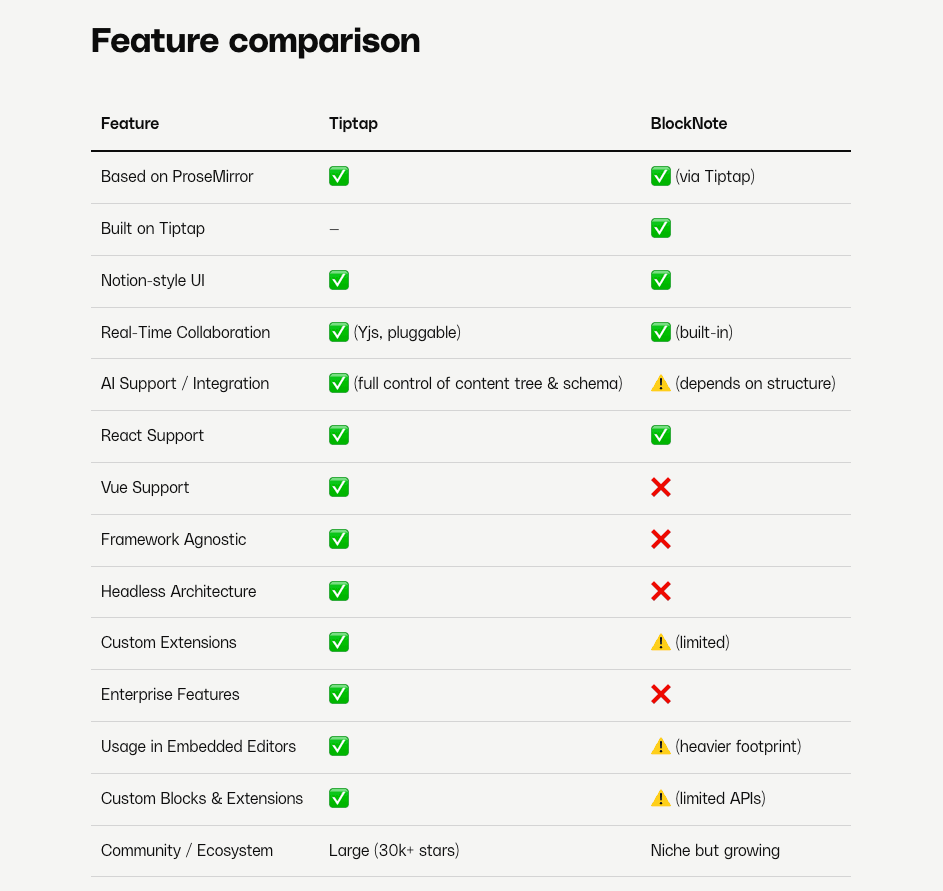
The choice between BlockNote and TipTap often comes down to how much control you want over the editor implementation. Both are excellent tools, but they serve different development philosophies and use cases.
TipTap provides direct access to the underlying ProseMirror primitives without abstraction layers. TipTap 3.0 (stable since July 2025) has closed some of the setup gap with a UI Components library, a ready-to-use Notion-style editor template, bidirectional Markdown support, and a paid AI Toolkit in beta, making it less of a "build everything yourself" proposition than it once was. That said, deep customizations still require solid ProseMirror knowledge. TipTap's own comparison page covers where each tool fits best.
BlockNote takes a more opinionated approach, providing pre-built block components and handling common editor patterns automatically. Expect faster development time but less flexibility for highly customized implementations.
For developers who need to ship quickly, BlockNote's batteries-included approach is appealing. You get drag-and-drop blocks, collaboration features, and a polished UI without building these features from scratch. The tradeoff is less control over implementation details.
In our experience, teams using BlockNote ship editor features faster than those building custom TipTap implementations, but TipTap projects reach more specialized functionality when deep customization is the priority.
TipTap excels when you need custom editor behaviors that don't fit standard patterns. If you're building something like a code editor, specialized markup tool, or highly customized writing interface, TipTap's flexibility becomes valuable.
The learning curve differs greatly between the two. BlockNote lets you build functional editors with minimal editor knowledge, while TipTap requires understanding ProseMirror concepts like schemas, transactions, and plugins.
Both editors work well with review and approval infrastructure. Velt's BlockNote library integration shows how review and approval features can enhance either editor choice. The key is choosing the editor that matches your team's expertise and project requirements.
Collaboration and Real-Time Editing
BlockNote's collaboration features handle the complex infrastructure required for multi-user editing. The integration with Yjs provides conflict-free replicated data types (CRDTs) that keep document consistency across all connected users.
Setting up collaboration requires configuring a collaboration provider and connecting it to your BlockNote editor instance. The provider handles synchronization between users, conflict resolution, and offline support automatically.
import * as Y from "yjs";
import { WebrtcProvider } from "y-webrtc";
import { BlockNoteView } from "@blocknote/mantine";
import { useCreateBlockNote } from "@blocknote/react";
import "@blocknote/core/fonts/inter.css";
import "@blocknote/mantine/style.css";

const doc = new Y.Doc();
const provider = new WebrtcProvider("my-document-room", doc);

function CollaborativeEditor() {
  const editor = useCreateBlockNote({
    collaboration: {
      provider,
      fragment: doc.getXmlFragment("document-store"),
      user: {
        name: "User Name",
        color: "#ff0000",
      },
    },
  });

  return <BlockNoteView editor={editor} />;
}
Performance considerations become important as your user base grows. BlockNote's collaboration features are optimized for typical document editing scenarios, but you'll want to test with your expected user loads and document sizes. Enterprise teams often need more powerful collaboration infrastructure than basic real-time editing.
For teams building complete multi-user editing experiences, BlockNote's editor pairs well with review and approval infrastructure like Velt. Features like live cursors, contextual comments, approval workflows, and audit trails require a dedicated review layer beyond what BlockNote provides natively.
The CodeSandbox examples include collaboration demos that show real-time editing in action. Review these before building your own collaborative features to help you better understand the user experience and technical implementation.
Adding Collaboration to BlockNote with Velt
While BlockNote's collaboration features are great for getting up and running quickly with capabilities like commenting and reactions, scaling beyond simple document editing can prove challenging. Major infrastructure expertise is needed to handle complex scenarios that require production-ready features like load balancing, fault tolerance, and cross-server synchronization.
Velt is review and approval infrastructure that layers on top of BlockNote's real-time editing. Where BlockNote handles document sync and block manipulation, Velt adds the human review layer: contextual comments anchored to content, formal approval workflows, notifications, audit trails, and recording.
Velt ships 25+ production-ready features including comments, approval workflows, presence, notifications, audit trails, and recording so teams can build a complete review layer on top of BlockNote without starting from scratch.
Managed Infrastructure
Yjs requires you to manage WebSocket servers, handle reconnection logic, and implement offline synchronization. Velt provides enterprise-grade infrastructure with 99.999% uptime, automatic scaling, and reliable networking that handles edge cases you might not even know exist.
Advanced Features Beyond CRDTs
While Yjs handles data synchronization, collaborative apps need much more. Velt comes with features that normally take months to build and maintain with a custom Yjs implementation like recording, voice and video huddles, notification systems, and analytics tracking.
Customization Without Complexity
Velt's customization options let you style components to match your brand while maintaining the underlying collaboration infrastructure. You get the flexibility of custom implementation without the maintenance burden.
Multiple Use Cases
Whether you're building document editors, design tools, or data dashboards, Velt's use case examples show how the same review and approval infrastructure adapts to different application types. This versatility eliminates the need to architect custom solutions for each project.
Engagement and Analytics
Beyond the editing layer, Velt helps you boost user engagement through features like contextual comments, reactions, and detailed analytics. These engagement tools are difficult to build with raw CRDT libraries but important for modern editing and review applications.
It's easy to see the value: get all the benefits of enterprise-grade collaboration without the implementation complexity, ongoing maintenance, or feature gaps that come with building everything from scratch.
Final thoughts on BlockNote as your rich text editor
BlockNote hits the sweet spot between flexibility and speed for React developers who need rich text editing without the months of custom development. Pair it with Velt to add the review and approval infrastructure your users will expect: contextual comments, approval workflows, notifications, and audit trails built into the product where the work happens. The combination gives you a complete editing and review solution that ships on schedule, so users get the polished experience they want and you stay focused on what makes your product unique.
FAQ
How long does it take to set up BlockNote in a React app?
Most developers can get BlockNote running in their React app within 10-15 minutes using the basic setup, with full customization and collaboration features typically taking 1-2 days depending on your requirements.
What's the main difference between BlockNote and TipTap?
BlockNote provides a batteries-included approach with pre-built block components and collaboration features out of the box, while TipTap offers more control over editor internals but requires building most features from scratch.
Which UI package should I use: @blocknote/mantine, @blocknote/shadcn, or @blocknote/ariakit?
Choose Mantine for a complete design system with minimal setup. Pick ShadCN if you're already on Tailwind CSS and want more granular control over component styling. Go with Ariakit if you prefer a lightweight headless option with accessibility primitives built in.
Can I add real-time collaboration to BlockNote without building my own backend?
Yes, BlockNote integrates with hosted collaboration services and uses Yjs for conflict-free document synchronization, eliminating the need to build custom collaboration infrastructure.
When should I consider using BlockNote over building a custom editor?
If you need a block-based editor with collaboration features and want to ship within weeks instead of months, BlockNote is ideal. Teams typically ship editor features faster compared to building custom solutions.